Wednesday, 1 March 2017

Feedback from my poster ideas

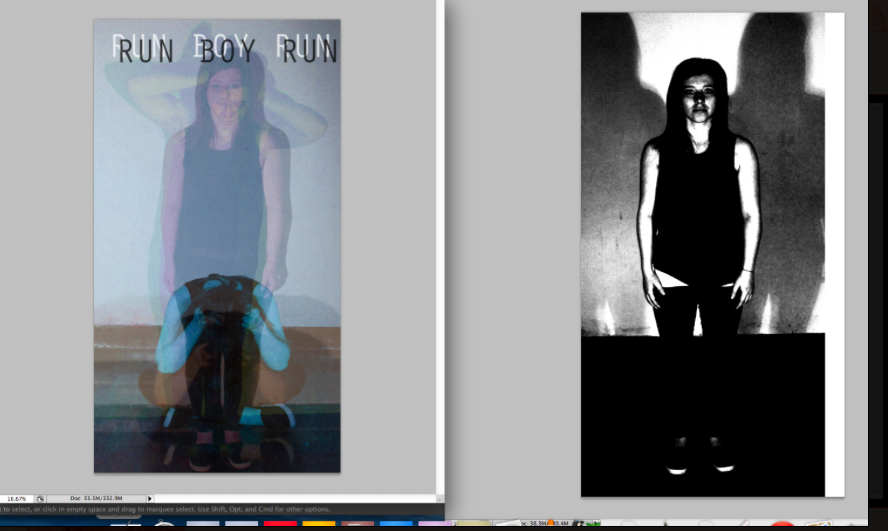
I printed out my ideas for my posters and took to my audience to get some feedback.

* 'I really like the different colours that you have used, I think that it makes it eycatching and unique'
* 'The title is very clear and effective'
* 'The way that you have layered the photo's up showing different emotions, is very deep and effective'
* 'I think that this poster needs more information on it such as the releasing date and the sponsors logo's'
* I think that the title could be too much and because the their is so much going on in the main image, i think that by having a simple title would make the poster more effective'
* 'I think that you could experiment with the colours of the titles, you should try more vibrant colours to make it more eye catching for the audience'


* 'This is just a photo it needs more context to show its for a music video, you should add a title and the bands name'
* 'I like how you have really contrasted this photograph it makes it very effective and bold'
* 'I think that this could make a good poster because it would be simple but effective'

Wednesday, 22 February 2017

Video so far..

Trouble with editing

 In this section of the editing I am trying to achieve an overlaid video effect so that it looks like their is more than one person in the video. I also want this section to be edited to the beat, I am finding this section difficult because their is so many effects that are on each video then they have to be put together and it's making the video glitch and is not working properly yet. I have tried to re-insert the videos back in but the same problem is occurring. As you can see in the screenshot above this is the section of video that it glitching i have rendered it many of times and in the end video their will be more than just the 3 videos overlaying in this section. So hopefully i can resolve this problem and carry on editing so that all the videos are working. 

Editing (slowing down the footage)

 This section of the music video is near the beginning, for this I have decided that i wanted to slow down the footage. I think that by doing this it creates more of an effect and it gives the viewer time to concentrate on the surroundings and the body language of the main protagonist. As you can see in the screenshot below this is how I changed the speed of the clip, I think that it was very effective to slow down the clip. From here I am going to move on to adding a faster clip at the end of this clip so that it brings back the pace to real life and brings the panic back into the video. 

Editing in progress

I have started started to edit the chorus drumming sequence, for this I want the editing to be slick and fast and for the editing to be on the beat to make it more effective. I also thought that putting in a flicker of colour it will make the sequence bolder and more eye catching for the viewer. As you can see their are a lot of small clips that i have cut up in order to create the glitch effect, I think that this looks really good i just need to finish it. I have had some problems with this as some times it doesn't play properly and other times it doesn't play at all. I think that i am having this problem because their are so many different effects that the video can't handle to do everything at the same time. But when i export the video it works and it is a very effect technique.  
The screenshot above shows how I have changed the colour to make the abstract vibrant colours like in the screenshot at the top. I have used the 'Colour Balance (HLS)' effect so that i can change the saturation and the hue of each video. 

Tuesday, 17 January 2017

Filming in the Main Hall and Risk Assessment

so today I manage to film some more footage for my music video. Today I filmed in the main hall, here I used the studio lights to create some more running footage. I have chosen this location because when filming the running sequence it makes you focus more on the main protagonist rather that the surrounding. another good reason for filming here is when you use the lights on the character it creates shadows and the shadows give the video more edge and a different dimension. Whilst I was filming I also took photos for my CD cover.


Risk Assessment

Risk
High/ Medium/ Low risk
How to get over it
Slippery surfaces could slip over whilst running
Low
Make sure my actor has grippy shoes on and ensure that I the stage is clean and has no water on it.
The actor could run into objects around the stage
Medium
Ensure that the stage is cleared and do the filming in the middle of the stage so that the protagonist doesn’t run into the wings.
The cables in from the lights could get in the way and someone could trip over them.
High
Make sure that the wires are out of the way and make sure that all the people at the shooting are aware of where the cables are.

Give everyone at the shoot and tell them what the dangers are and how to make sure that no accidents happen.